

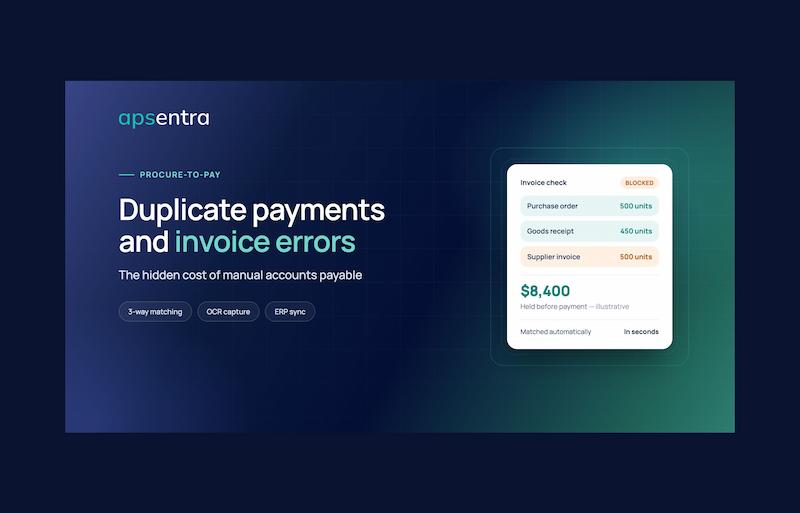
Here’s a scene that plays out in finance departments every day.
A supplier emails an invoice for $8,400. A week later, having heard nothing, they post a paper copy “just in case.” The emailed version gets typed into the accounting system by one person. The paper version lands on a different desk, gets entered with the invoice number written slightly differently, and is approved by a manager who doesn’t remember seeing it before.
Both are paid. Nobody notices.
Months later, during a year-end review, someone spots two identical amounts to the same supplier. By then, recovering the money means an awkward conversation with the supplier, a credit note that takes weeks to arrive, and hours of staff time spent tracing what happened.
Multiply that by hundreds or thousands of invoices a month, and you begin to see the problem. Manual accounts payable doesn’t just slow a business down; it lets money slip out quietly through duplicate payments, pricing errors, and invoices for goods that never arrived.
This article explains, in plain language, where those errors come from, what they really cost, and how two technologies—3-way matching and OCR invoice processing—stop them before money leaves the business.
Table of Contents
What Is Accounts Payable, and Why Does It Go Wrong?
Accounts payable (AP) is simply the process of paying the bills your company owes to suppliers. On paper, it sounds straightforward: receive an invoice, check it, approve it, pay it.
In reality, a single invoice can pass through many hands and systems:
-
Someone orders goods or services
-
The supplier delivers them
-
Someone receives and signs for the delivery
-
The supplier sends an invoice by email, post, or supplier portal
-
An AP clerk types the invoice details into the accounting system
-
Someone checks the invoice against the order and delivery
-
A manager approves payment
-
Finance schedules and releases the payment
When most of these steps rely on people reading documents, typing numbers, and comparing paperwork by eye, errors are inevitable. Not because people are careless, but because repetitive manual work at volume is exactly the kind of task humans are worst at doing perfectly.
The Most Common Invoice Errors (and How They Happen)
1. Duplicate payments
The same invoice is paid twice, or occasionally more. Common causes include:
-
The supplier sends the invoice through two channels (email and post, or email and portal)
-
A supplier sends a reminder that looks like a new invoice
-
The invoice number is typed slightly differently each time (“INV-1045” vs “INV1045” vs “1045”), so the system doesn’t recognize it as a duplicate
-
The same supplier exists twice in the system under slightly different names
-
Invoices are processed at different locations or entities without a shared view
2. Overbilling and price discrepancies
The invoice shows a higher unit price than was agreed in the purchase order or contract. Sometimes it’s a supplier mistake; sometimes an old price list was used; sometimes a promised discount simply wasn’t applied. If nobody compares the invoice line by line with the agreed price, the higher amount gets paid.
3. Paying for goods that never arrived
A supplier invoices for 500 units, but only 450 were delivered. Or a service was invoiced in full, but only partly completed. Without checking the invoice against what was actually received, the company pays for the full amount.
4. Data entry mistakes
A misplaced decimal point turns $1,250.00 into $12,500.00. A digit is swapped in an account number. A tax amount is entered in the wrong field. These are small slips with potentially large consequences.
5. Wrong coding and budget allocation
The invoice is paid correctly but charged to the wrong department, cost centre, project, or budget. That distorts financial reporting and makes budget control unreliable.
6. Late payments and missed discounts
When invoices get stuck in inboxes or waiting for approval, companies pay late fees, damage supplier relationships, and miss early-payment discounts that suppliers would happily have offered.
7. Invoice fraud
Manual processes are also vulnerable to deliberate deception: fake invoices from vendors that don’t exist, inflated invoices, or fraudulent emails asking AP to “update” a supplier’s bank details so the next payment goes to a criminal’s account. When checks rely on someone noticing something looks odd, well-crafted fraud can slip through.
The Real Cost of Manual Accounts Payable
The obvious cost is the money paid out in error. But it’s only part of the picture.
Direct financial loss. Some duplicate and incorrect payments are never recovered, especially if the supplier has gone out of business, disputes the claim, or the error is discovered long after the fact.
Recovery costs. Even when money is recovered, it takes staff time to identify the error, contact the supplier, obtain credit notes, and correct the accounting records.
Processing cost per invoice. Every invoice that’s opened, typed, checked, chased, and approved manually costs staff time. For companies processing thousands of invoices, that adds up to a significant amount of work that creates no value.
Missed discounts and late fees. Slow approvals mean lost early-payment discounts and penalties for paying late.
Supplier relationship damage. Suppliers who are paid late, paid incorrectly, or constantly asked to resend invoices become less willing to offer good terms.
Unreliable financial data. Errors in coding and amounts flow into management reports, budgets, and forecasts, undermining the decisions based on them.
Audit and compliance risk. Auditors expect clear evidence that invoices were checked and approved properly. Gaps in the paper trail increase audit time and raise red flags.
A Simple Illustration
Consider a company that processes 2,000 supplier invoices a month, averaging $3,000 each, or $72 million a year. If just 0.1% of that value is lost to duplicate payments and overbilling that never gets caught, that’s $72,000 a year gone. Add missed early-payment discounts, late fees, and the staff hours spent on manual entry and error correction, and the true cost is several times higher.
3-Way Matching, Explained Simply
The everyday version
Imagine you order three pizzas for a team lunch.
-
The order: you ask for three large pizzas at $15 each.
-
The delivery: the driver arrives, and you count what’s in the bag.
-
The bill: the receipt says what you’re being charged.
Before paying, you naturally check that all three match: you ordered three pizzas, three pizzas arrived, and you’re being charged for three pizzas at $15 each. If the bill says four pizzas, or the price says $18, or only two pizzas arrived, you’d question it before handing over the money.
That’s 3-way matching.
The business version
In business, the three documents are:
-
The purchase order (PO): what the company agreed to buy, including quantities, prices, and terms.
-
The goods receipt (or receiving report): what was actually delivered or which services were actually completed.
-
The supplier invoice: what the supplier is asking to be paid.
3-way matching compares these three documents line by line. If quantities, prices, and totals all line up, the invoice is approved for payment. If they don’t, the invoice is flagged as an exception for someone to review before any money is paid.
What about 2-way matching?
2-way matching compares only the purchase order and the invoice. It confirms you’re being charged what you agreed to pay, but it doesn’t confirm that you actually received what you’re paying for. It can be fine for some services or low-risk purchases, but for physical goods, 3-way matching gives much stronger protection.
What 3-way matching catches
|
Problem |
How 3-way matching catches it |
|
Invoice price higher than agreed |
Invoice price doesn’t match the PO price |
|
Paying for undelivered goods |
Invoice quantity is higher than the goods receipt |
|
Invoices for things never ordered |
No matching purchase order exists |
|
Duplicate invoices |
The PO has already been fully invoiced and paid |
|
Fake supplier invoices |
Tolerances: allowing for the real world
Not every tiny difference is a problem. A few cents of rounding, or a delivery that’s slightly over or under because of packaging sizes, shouldn’t hold up payment. Good matching systems use tolerances, pre-agreed limits such as “allow differences of up to 1% or $10.” Invoices within tolerance are approved automatically; those outside it are routed to a person to review.
Why 3-way matching is hard to do manually
In principle, a clerk can match three documents by hand. In practice, it means finding the right PO in one system, the delivery note in another (or in a pile of paper), and the invoice in an inbox, then comparing every line. At volume, it’s slow, tedious, and precisely where tired eyes miss things. That’s why many companies either skip it or only do it for large invoices, leaving the rest unchecked.
OCR Invoice Processing, Explained Simply
What OCR means
OCR stands for optical character recognition. In simple terms, it’s technology that reads text from images and documents, such as a scanned paper invoice or a PDF attached to an email, and turns it into data a computer can use.
Instead of a person looking at an invoice and typing the supplier name, invoice number, date, line items, amounts, and tax into the accounting system, OCR does the reading and entry automatically.
How modern OCR goes further
Early OCR simply converted images into text. Modern, AI-powered invoice processing is smarter. It understands what the text means:
-
It recognizes which number is the invoice number and which is the order number
-
It identifies the supplier, the dates, the currency, and the tax amounts
-
It reads individual line items, quantities, and unit prices
-
It works across different invoice layouts, because every supplier’s invoice looks different
The extracted data is then checked automatically against rules and existing records. Does this supplier exist? Has this invoice number already been received? Does it reference a valid purchase order?
What OCR fixes
-
Typing errors disappear. No more misplaced decimals or swapped digits from manual entry.
-
Processing is faster. Invoices are captured in seconds rather than minutes.
-
Nothing gets lost. Every invoice is captured digitally the moment it arrives, instead of sitting in an inbox or a paper tray.
-
Duplicates are easier to spot. Consistent data capture means the same invoice received twice looks the same, making duplicate detection far more reliable.
Why OCR alone isn’t enough
OCR solves the data entry problem, but it doesn’t decide whether an invoice should be paid. An invoice can be read perfectly and still be for the wrong price, the wrong quantity, or goods that never arrived.
That’s why the real power comes from combining OCR with 3-way matching: OCR reads the invoice accurately; 3-way matching checks whether it’s right.
Putting It Together: What Automated AP Looks Like
Here’s how the process works when OCR and 3-way matching are built into one system:
-
An invoice arrives by email, upload, or scan.
-
OCR captures the data automatically: supplier, invoice number, dates, line items, and amounts.
-
Validation rules check the basics: Is the supplier approved? Has this invoice already been received? Are the required fields present?
-
3-way matching runs: the invoice is compared with the purchase order and the goods receipt.
-
Matching invoices are approved automatically within agreed tolerances.
-
Exceptions are flagged and routed to the right person, with all three documents shown side by side, so review takes minutes instead of hours.
-
The approved invoice syncs with the ERP or accounting system for payment, with correct coding to the right budget and cost centre.
-
Every step is recorded in a full audit trail.
The result is a process where people focus only on genuine problems rather than checking every invoice by hand, and where duplicate payments and incorrect invoices are caught before payment, not discovered months later.
How APSentra Minimizes Human Error in Accounts Payable
APSentra is an AI-driven source-to-pay procurement platform that helps companies control company-wide spend. One of its core benefits is human error minimization: replacing error-prone manual work with digital guardrails that keep data accurate and prevent costly financial discrepancies.
APSentra’s approach can be summed up in three stages:
|
From manual processes |
Through digital guardrails |
To error-free operations |
|
Data entry errors, missed deadlines, duplicate payments |
Standardized workflows, automated checklists, validation rules |
Higher data accuracy and prevented financial discrepancies |
Here’s how that works in practice.
AI-Powered OCR Invoice Capture
APSentra automates invoice scanning with OCR, capturing invoice data without manual typing. AI-powered processing extracts the details that matter, removing the keystroke errors where many AP problems begin, and it can capture receipts instantly as well.
Automatic 3-Way Matching
APSentra’s procure-to-pay automation matches purchase orders, goods receipts, and invoices in seconds. Invoices that line up move forward; those that don’t are flagged before payment. That means overbilling, short deliveries, and duplicate invoices are caught at the point where they’re cheapest to fix: before the money goes out.
Validation Rules and Automated Checklists
Standardized workflows and validation rules make sure every invoice passes the same checks, every time, regardless of who is processing it or which location it comes from. Automated checklists remove the reliance on memory and experience that makes manual AP so inconsistent.
Errors Prevented Upstream, Not Just Caught Downstream
Many invoice problems start long before the invoice arrives. APSentra addresses them at the source:
-
Intelligent intake and approval governance ensures purchases are requested and approved properly, so there’s always a valid purchase order to match against.
-
Consolidated demand helps prevent the duplicate orders that lead to duplicate invoices.
-
Real-time budget validation and commitment tracking make sure spending is checked before money is committed and invoices are charged to the correct budgets.
-
Contract lifecycle management with AI-assisted extraction of key terms helps ensure invoices reflect the prices and conditions actually agreed.
-
Supplier onboarding and management keeps supplier records organized in one system, reducing the duplicate or inconsistent supplier entries that often hide duplicate payments.
Seamless ERP and Accounting Synchronization
APSentra is ERP-agnostic and synchronizes with the systems finance teams already use, including SAP, SAP Business One, Oracle, Microsoft Dynamics 365 Business Central and Dynamics NAV, NetSuite, QuickBooks, and Odoo. Purchase orders, invoices, budgets, and payments stay aligned across systems, eliminating the re-keying between tools that introduces errors.
Full Audit Trails and Security
Every action in APSentra is recorded. Role-based access control ensures people can only view and approve what they’re responsible for, and full audit trails show who did what and when. Combined with APSentra’s built-in anti-corruption and security architecture and independent security testing, this makes AP both more accurate and harder to exploit.
Analytics That Spot Problems Early
APSentra’s unified analytics provide real-time visibility across suppliers, invoices, and spending categories. The AI assistant can analyze spend and surface actionable insights, helping finance teams identify unusual patterns before they become costly problems.
APSentra in Numbers
APSentra is trusted by more than 130 enterprise clients across agriculture, manufacturing, retail and FMCG, construction, financial services, and telecom and utilities.
|
Metric |
Result |
|
Procurement requests processed |
2,050,000+ |
|
Purchase orders executed |
443,560 |
|
Active contracts managed |
126,200 |
|
Suppliers and counterparties connected |
120,000+ |
|
Total procurement volume managed |
≈ $129 billion |
|
Verified savings generated |
≈ $16 billion |
|
Customer satisfaction |
94% |
According to APSentra, organizations using the platform typically achieve up to 25% cost savings, up to 80% faster procurement processes, and 100% transparency and control across procurement operations.
APSentra’s customer cases include Bunge, a large pharmaceutical distributor handling high-volume, multi-category procurement, a restaurant chain with more than 100 locations, a fashion retail group, and an agribusiness that has managed 100% of its procurement through APSentra for more than ten years.
Live in About 8 Weeks
APSentra’s standard implementation takes around eight weeks: one week of consulting, three weeks of implementation and automation, three weeks of integration with ERP and accounting systems, and one week of team training, followed by ongoing control and optimization. APSentra’s team also provides procurement audits, consulting, benchmarking, and change management support.
Quick Checklist: Is Your AP Process Leaking Money?
Answer yes or no to each question:
-
Are invoices still typed manually into your accounting system?
-
Do suppliers send invoices through more than one channel?
-
Do you pay invoices without confirming the goods or services were received?
-
Can invoices be paid without a matching purchase order?
-
Have you discovered a duplicate payment in the past year?
-
Do invoices regularly wait days or weeks for approval?
-
Do you miss early-payment discounts or pay late fees?
-
Could someone change a supplier’s bank details without a second check?
-
Does the same supplier appear more than once in your records?
-
Would it take more than a day to produce a full audit trail for a specific invoice?
If you answered “yes” to three or more, your accounts payable process is very likely losing money through avoidable errors.
Practical Steps to Reduce Invoice Errors Today
Even before introducing new software, these steps help:
-
Enforce “no PO, no pay.” Require an approved purchase order for every eligible invoice.
-
Record deliveries consistently. Make sure goods receipts are logged promptly so invoices can be matched.
-
Use one invoice channel. Ask suppliers to send invoices to a single dedicated email address or portal.
-
Clean up supplier records. Merge duplicate supplier entries and control who can edit supplier details.
-
Verify bank detail changes. Confirm any change request directly with the supplier using contact details you already hold, not those in the request.
-
Standardize invoice numbering checks. Watch for the same number entered in slightly different formats.
-
Review a sample of past payments. Look for duplicate amounts, suppliers, and dates to measure your current exposure.
-
Automate matching and data capture. Move to a system that uses OCR and 3-way matching so these checks happen on every invoice, not just the ones someone has time to review.
Final Thoughts
Duplicate payments and invoice errors rarely make headlines inside a company. They don’t come with alarms. They hide in ordinary-looking transactions, slip through busy weeks, and show up long after the money has gone, if they show up at all.
The cause isn’t bad staff; it’s a process that asks people to do repetitive, detail-heavy work perfectly at high volume. The solution is to let technology do what it does best. OCR reads invoices accurately. 3-way matching checks every invoice against what was ordered and what was received. Validation rules and standardized workflows make sure nothing is skipped.
APSentra brings these capabilities together in one platform, turning manual, error-prone accounts payable into a controlled, accurate, and auditable process. If you want to see how much manual AP might be costing your business, APSentra offers a free demo and a savings calculator on its website.
Frequently Asked Questions
What is a duplicate payment?
A duplicate payment happens when a company pays the same supplier invoice more than once. It’s usually caused by invoices received through multiple channels, inconsistent data entry, or duplicate supplier records.
What is 3-way matching in simple terms?
3-way matching compares three documents before an invoice is paid: the purchase order (what you agreed to buy), the goods receipt (what actually arrived), and the invoice (what the supplier is charging). If all three match, the invoice can be paid; if not, it’s flagged for review.
What’s the difference between 2-way and 3-way matching?
2-way matching compares only the purchase order and the invoice. 3-way matching also checks the goods receipt, confirming that you actually received what you’re paying for.
What does OCR do in accounts payable?
OCR (optical character recognition) reads invoice data from scanned documents and PDFs and enters it into the system automatically, eliminating manual typing and the errors that come with it.
Can automation completely eliminate invoice errors?
No system can guarantee zero errors, but automation dramatically reduces them. It removes manual data entry, applies the same checks to every invoice, and flags exceptions for human review before payment rather than after.
Does APSentra work with our existing accounting software?
Yes. APSentra is ERP-agnostic and integrates with systems including SAP, Oracle, Microsoft Dynamics, NetSuite, QuickBooks, and Odoo, keeping invoices, purchase orders, and payments in sync.